Did I actually confirm that booking?
The quote is in an email. The date is in a message. The reference is on a note. You want to know what is agreed, not piece it together again.

Moving house planner and checklist
Keys & Boxes keeps your packing, bookings, costs and address changes in one place, so you can see what is done and what needs you next.
One-off payment · Instant download · No subscription
UK and US moving workbooks, an 18-page Field Guide and five bonus tools.
If this sounds familiar
The hard part of moving is keeping the whole picture together while the list keeps growing.
The quote is in an email. The date is in a message. The reference is on a note. You want to know what is agreed, not piece it together again.
Packing, utilities, paperwork and address changes are all asking for attention. A list in your head is hard to check.
A box ID and inventory give the things you packed a place in the plan, not just a place in the van.
Packing is the part you can see. The paperwork, bookings and accounts that keep your household running need attention too. Keys & Boxes puts both in the same view.
What is going, where it is packed and how it gets there. Decluttering, boxes, access, loading and unpacking.
What keeps everyday life working. Utilities, address changes, paperwork, accounts, bookings, costs and confirmations.
See what you are getting
These workbook excerpts use sample entries from one example move. Use the tabs that apply to your move and come back to the same place whenever another job pops into your head.
Swipe or scroll to see more tabs.
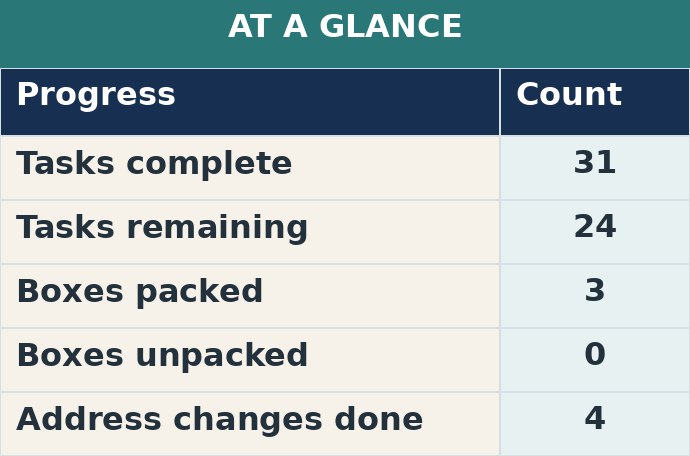
Dashboard. Check task, box and address change progress in one view.
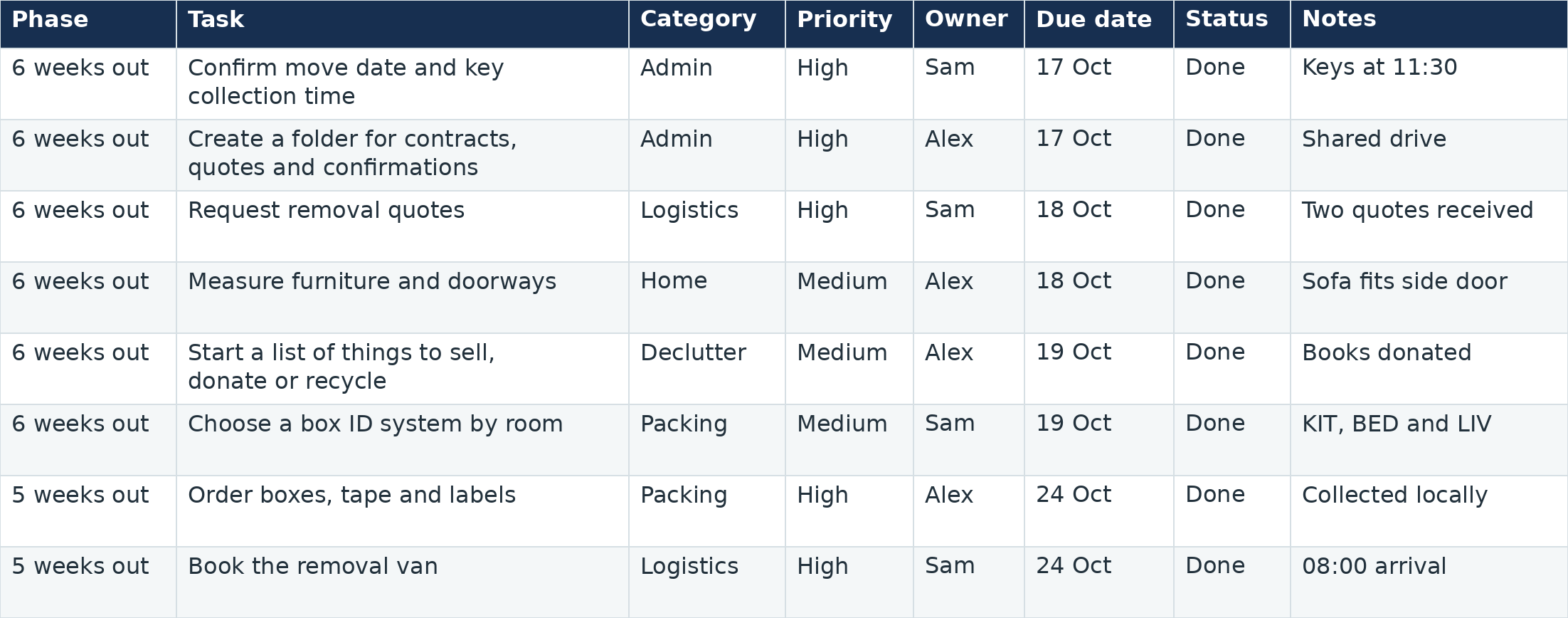
Master Tasks. 55 ready-made tasks with space for phase, priority, owner, due date, status and notes.

Box Inventory. 100 rows for box ID, room, contents and unpacking priority, with packed, loaded and unpacked fields.
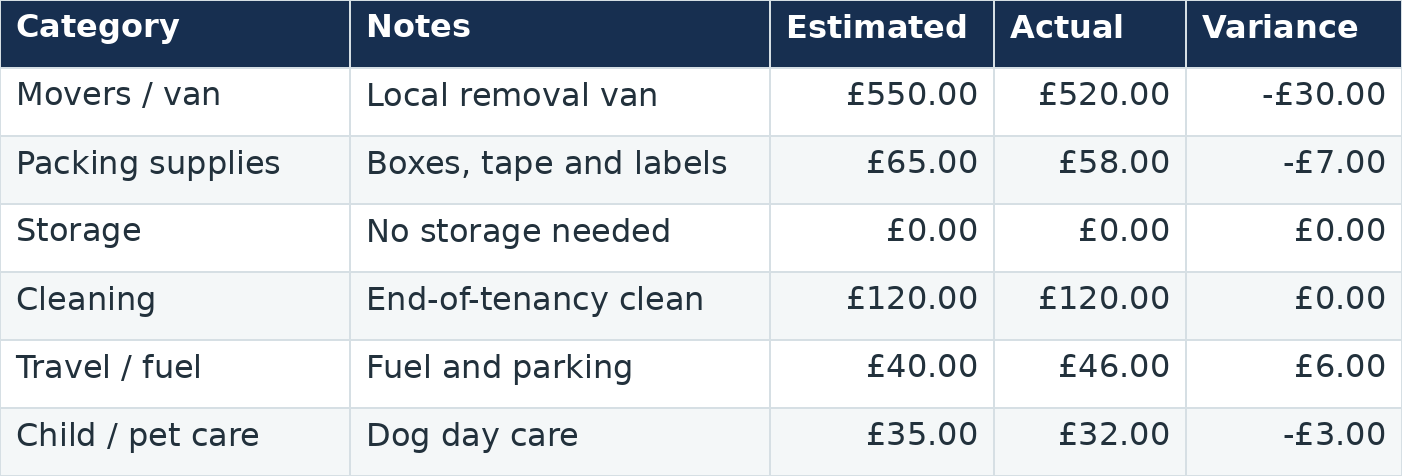
Budget. Estimated costs, actual costs and the difference in one place. Separate UK and USA workbooks are included, with pound and US dollar formatting.
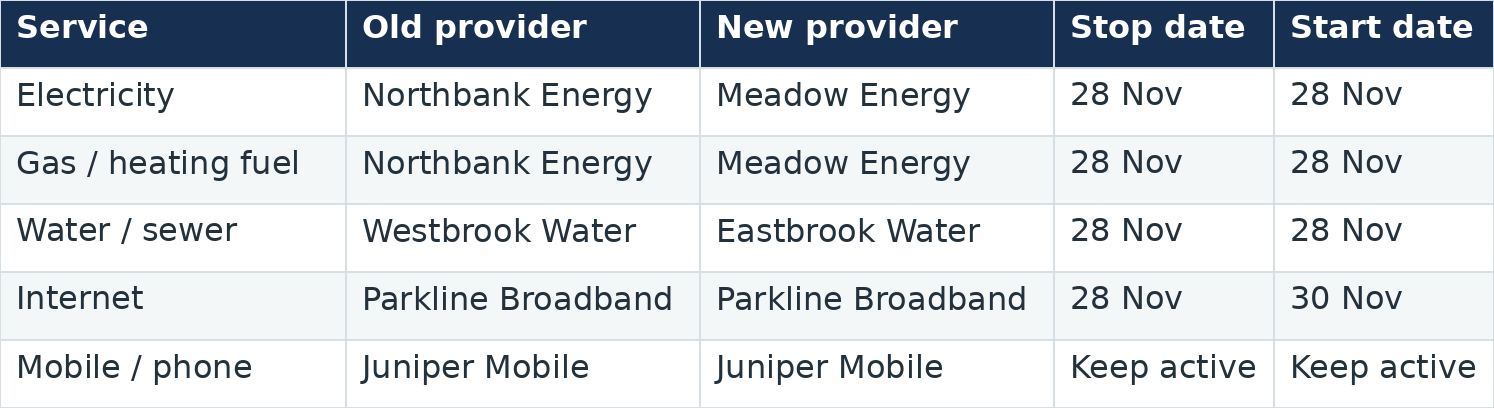
Utilities, Address Changes, Purchases and Contacts. Keep providers, switching dates and the people you need in their own tabs.
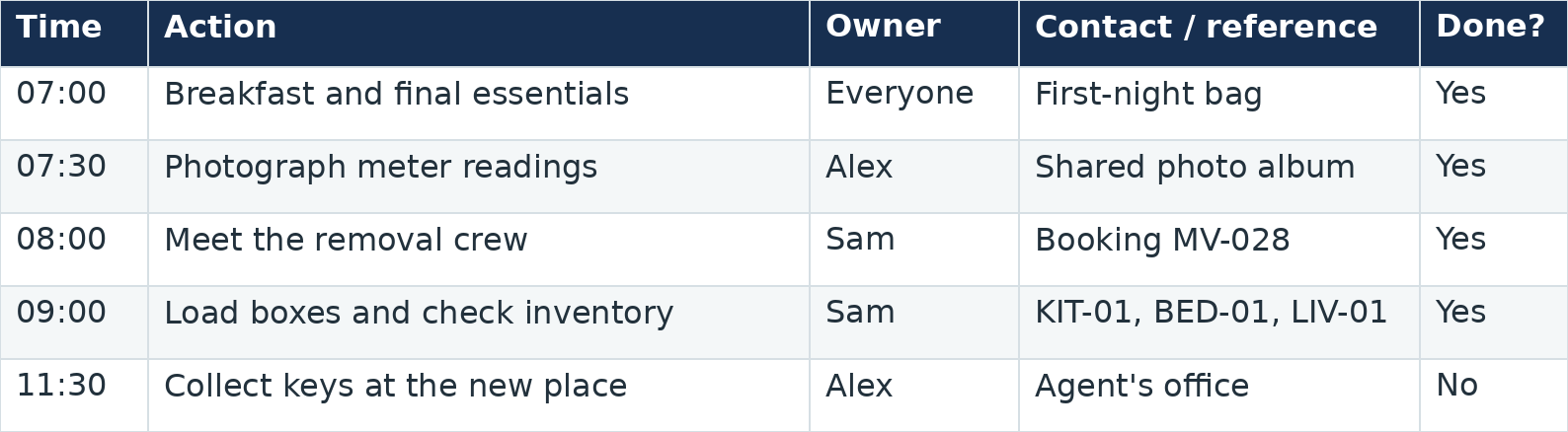
Moving Day and First Week. Plan the timing, jobs and responsibilities for moving day, then use a seven-day plan to settle in.
The method
Four phases give the move a practical order, without asking you to do everything today.
Phase 1
Get a clearer picture of what is going with you. Separate what matters before everything ends up in a box.
Phase 2
Keep dates, bookings and time-sensitive admin where you can check them, rather than trying to remember who said what.
Phase 3
Label boxes, keep an inventory and carry essentials separately, so you have a plan for the things you will need.
Phase 4
Make the new place functional before making it perfect. Start with essentials, then work through what still needs attention.
Everything included
A checklist from one place, a budget from another, a box list in your notes app and a pile of emails each do part of the job. Keys & Boxes brings them together.
Choose the UK or USA edition of the ten-tab spreadsheet for the jobs, costs, boxes and details that otherwise end up scattered across different places. Use one workbook for your move. The editions do not sync or convert currencies.
An 18-page PDF explaining the two moves, the four-phase method, setup and practical moving guidance. Customer start instructions are also included.
Keys & Boxes
£19.99 one-off payment
Complete your purchase securely on Payhip.
This is for you if
Worth knowing first
You receive the UK and USA editions of the Keys & Boxes Moving Command Center spreadsheet, the practical Moving Field Guide and five supporting bonus tools for labels, first-night essentials, address changes, moving-day handoff and the first week.
No. The command center is organized into clearly labeled sections. Start with the dashboard and use only the parts that are relevant to your move.
Yes. You can begin with your current tasks, budget, decluttering, contacts and box planning, then add or update dates when they become clear.
Yes. Choose the USA workbook for US dollar formatting and American terminology, or the UK workbook for pound formatting and UK terminology. The shared Field Guide and bonus PDFs retain some UK wording. Check local requirements for utilities, address changes and any legal or property matters.
No. It is a digital download. No physical item will be shipped.
If Keys & Boxes isn’t right for you, you can request a full refund within 14 days of purchase. Contact Peyson Digital to request a refund or get help with your download. Include your Payhip order number if you have it. Your statutory rights still apply.
Start with the free USA address change guide. For your first night, request the free First Night Box Checklist.
Bring the packing, paperwork, deadlines and moving-day details into one practical system. Then come back to check what is done and what needs attention next.
One-off payment · Instant download · No subscription